MCP on Bun and Hono with mcp-handler
mcp-handler is a Web-standard Request handler. Mount it on Bun and Hono to serve MCP over Streamable HTTP without building the transport yourself.
- mcp
- bun
- hono
- api
Author: John Ryan Cottam2 min read
An MCP tool can be ten lines. The transport around it is where the time disappears.
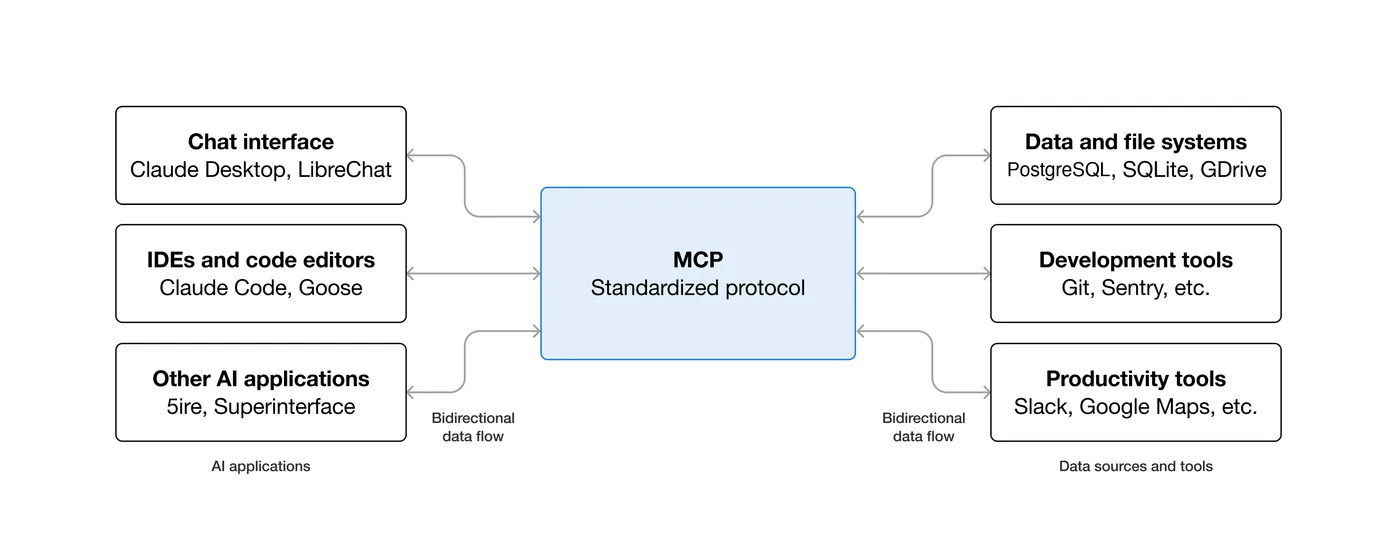 How MCP fits together — hosts (Claude, Cursor, etc.) connect to servers that expose tools and data sources. From the MCP getting started intro.
mcp-handler removes that layer. It turns an MCP server definition into a Web-standard (Request) => Promise<Response> handler. Hono already exposes the raw request. Bun already speaks Fetch.
The integration is one route.
bun add mcp-handler@^2 @modelcontextprotocol/server@^2 zod@^4import { Hono } from "hono";
import { createMcpHandler } from "mcp-handler";
import { z } from "zod";
const app = new Hono();
const handler = createMcpHandler(
(server) => {
server.registerTool(
"rollDice",
{
title: "Roll Dice",
description: "Roll one die with the requested number of sides.",
inputSchema: z.object({
sides: z.number().int().min(2).max(100),
}),
},
async ({ sides }) => ({
content: [{
type: "text",
text: String(1 + Math.floor(Math.random() * sides)),
}],
}),
);
},
{
serverInfo: {
name: "bun-hono-example",
version: "1.0.0",
},
},
);
app.get("/mcp", (c) => handler(c.req.raw));
app.post("/mcp", (c) => handler(c.req.raw));
export default app;Define the tool. Pass Hono’s c.req.raw to the handler. Return its Response.
What the handler actually does
mcp-handler owns the protocol handshake, message framing, and Streamable HTTP compatibility. Version 2 serves the current MCP protocol and falls back for 2025-era Streamable HTTP clients.
It does not serve the old HTTP+SSE transport. It does not add authentication. It does not decide how long your runtime may execute.
Those boundaries are useful. The handler owns MCP. Your application still owns deployment.
The tool description is part of the API
The model reads a tool’s name and description before it decides to call it.
“Search for things” forces the model to guess. “Search the product catalog by name, SKU, or category; returns price and inventory” gives it a decision it can make.
Describe when to call the tool, what inputs it accepts, and what it returns. The implementation can be perfect and still go unused if the description is vague.
Test the tool before the model
Use the MCP Inspector first:
npx @modelcontextprotocol/inspectorConnect to http://localhost:3000/mcp, call the tool directly, and inspect the response. Debugging through a chat client adds a model decision to every test.
Once the tool works, point any Streamable HTTP client at the same URL:
{
  "mcpServers": {
    "my-server": {
      "url": "http://localhost:3000/mcp"
    }
  }
}
For stdio-only clients, bridge to the same endpoint with mcp-remote. Do not build a second server.
Before deployment, add token verification or OAuth and set the timeout on your hosting platform. Then keep the tool layer boring.
That is the point: define the capability once, serve it over one HTTP handler, and let every MCP-compatible client use it.